> ## Documentation Index
> Fetch the complete documentation index at: https://docs.autosana.ai/llms.txt
> Use this file to discover all available pages before exploring further.
# Multi-Device Testing
> Test workflows that span two mobile devices with one Autosana agent.
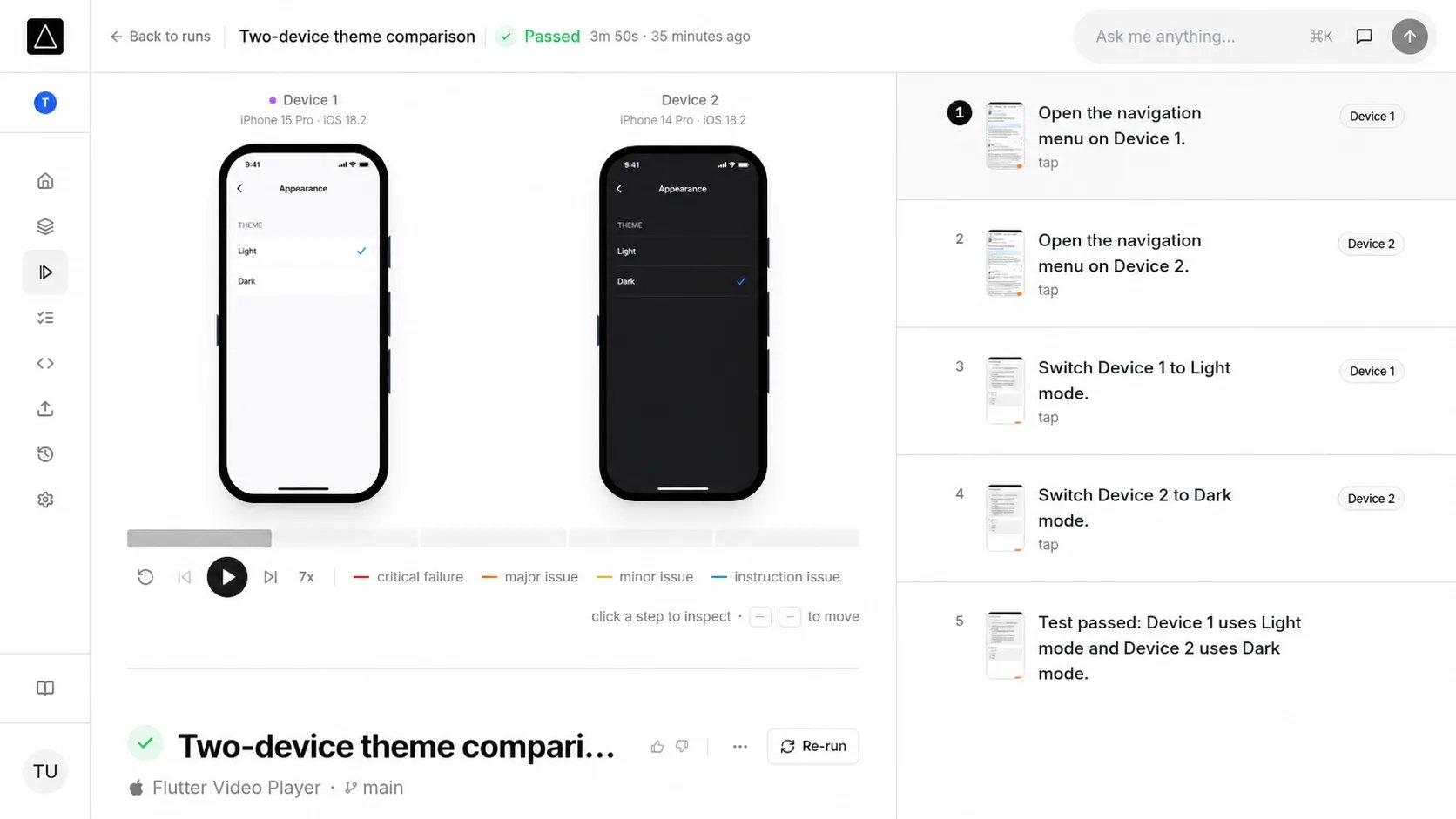 Multi-device testing lets one agent control two phones in the same flow. It is
useful for messaging, sharing, collaboration, and other workflows where an
action on one device affects another.
Multi-device testing is an advanced feature. It currently supports up to two
cloud mobile devices.
## How it works
* The agent sees both screens and takes one action at a time on **Device 1** or
**Device 2**.
* Both devices run the same app build and platform, but can use different models
and OS versions.
* Both devices must be virtual or both must be physical.
## Set up a flow
In the flow editor, expand **Advanced options** and set **Number of devices** to
**2**. Refer to **Device 1** and **Device 2** in the instructions:
```text theme={null}
On Device 1, switch the app to light mode. On Device 2, switch it to dark mode.
Verify that each device keeps its selected theme.
```
See [Flows](/flows) for dashboard setup and [Code-managed flows](/code-managed-files)
for the `.autosana` schema. When adding a flow to a suite, all flows and Auth
Instructions must use the same device count. See [Suites](/suites).
## Run the flow
Choose a model and OS for each device when starting the run. The same ordered
device selection is supported across Autosana:
* [Runs API](/api-runs)
* MCP run tools, using the same device order as the [Runs API](/api-runs)
* [Automations](/automations)
* [GitHub Actions](/ci-cd-integration)
See [Real device testing](/real-device-testing) for physical-device availability
and requirements.
## Review results
The run viewer shows both screens and identifies the device used for each
action. Logs, performance data, network data, recordings, and other artifacts
are separated by device where available.
API results return ordered device metadata and a `device_index` for each
device-specific action. See the [Runs API reference](/api-runs) for the response
schema.
## Current limitations
* A flow can use at most two devices.
* Both devices use one app build and platform.
* Virtual and physical devices cannot be mixed in one run.
* State caching is disabled for multi-device runs.
Multi-device testing lets one agent control two phones in the same flow. It is
useful for messaging, sharing, collaboration, and other workflows where an
action on one device affects another.
Multi-device testing is an advanced feature. It currently supports up to two
cloud mobile devices.
## How it works
* The agent sees both screens and takes one action at a time on **Device 1** or
**Device 2**.
* Both devices run the same app build and platform, but can use different models
and OS versions.
* Both devices must be virtual or both must be physical.
## Set up a flow
In the flow editor, expand **Advanced options** and set **Number of devices** to
**2**. Refer to **Device 1** and **Device 2** in the instructions:
```text theme={null}
On Device 1, switch the app to light mode. On Device 2, switch it to dark mode.
Verify that each device keeps its selected theme.
```
See [Flows](/flows) for dashboard setup and [Code-managed flows](/code-managed-files)
for the `.autosana` schema. When adding a flow to a suite, all flows and Auth
Instructions must use the same device count. See [Suites](/suites).
## Run the flow
Choose a model and OS for each device when starting the run. The same ordered
device selection is supported across Autosana:
* [Runs API](/api-runs)
* MCP run tools, using the same device order as the [Runs API](/api-runs)
* [Automations](/automations)
* [GitHub Actions](/ci-cd-integration)
See [Real device testing](/real-device-testing) for physical-device availability
and requirements.
## Review results
The run viewer shows both screens and identifies the device used for each
action. Logs, performance data, network data, recordings, and other artifacts
are separated by device where available.
API results return ordered device metadata and a `device_index` for each
device-specific action. See the [Runs API reference](/api-runs) for the response
schema.
## Current limitations
* A flow can use at most two devices.
* Both devices use one app build and platform.
* Virtual and physical devices cannot be mixed in one run.
* State caching is disabled for multi-device runs.